Where can I bind my keys?
You can bind on the green marked keys:
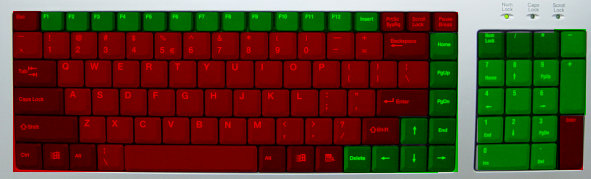
* This image may not be accurate!
 Medal of Honor: Allied
Assault
Medal of Honor: Allied
Assault
Developer: EA Games
Home-Page:
http://www.ea.com/official/moh/alliedassault
Latest Version: v1.11 US (custom)
* Timescale controls are not available
Feature Supported AVA Yes Play lists Yes Config Selection Yes Additional Command Line Parameters Yes Default mod selection Yes Automatic Mod Detection Yes Demo Controls Yes *
If the AVA Update is not installed you wont to play all these demo types. You can then only play demos with the version installed.
Demo Extension Version Supported dm3 v1.11 US
This is the default layout, you may have changed the controls. Use the basic demo control maker to set you own demo controls.
Function Key Decrease Playback Speed by 0.1 below 1.0 and by halve above 1.0 (Minimum 0.0) Left Arrow Increase Playback Speed by 0.1 below 1.0 and doubles above 1.0 (Maximum 128.0) Right Arrow Normal Playback Speed (1.0) Up Arrow Freezes demo (pictures freezes, but demo continues at slow pace) Down Arrow Quit Game Numpad 0 3rd Person left pan Numpad 1 Toggle Timer Numpad 2 3rd Person right pan Numpad 3 Restart Demo Numpad 4 Toggle Third-person mode Numpad 5 Take Screenshot Numpad 6 Decrease in game Volume Numpad 7 Mute Sound Numpad 8 Increase in game Volume Numpad 9 Display Score (where possible) Numpad Minus (-) Display Demo Control Help (where possible) Numpad Plus (+) Decrease 3rd Person Range Home Increase 3rd Person Range End Select Previous Demo Play list mode only) F5 Select Next Demo Play list mode only) F6 Start selected Demo (Play list mode only) F7 Please note that pressing any other key on the keyboard except to those listed here will bring you to the menu. Key marked red do not work.
Where can I bind my keys?
You can bind on the green marked keys:
* This image may not be accurate!
Demo support was made possible by Wombat who created a modified executable of the game and activated demo support. Used with permission. http://home.arcor.de/wombat24
If you got any problems check out the Frequently Asked Questions (FAQ) section.